In 2023, building an AI agent meant copy-pasting a ReAct prompt from a tutorial and hoping the LLM would reliably call tools in the right order. Most of the time it did not. In 2025, LangGraph is how teams build agents that actually work in production — reliably, at scale, with observable state and controllable behaviour.
If you are building anything beyond a simple question-answering chatbot, you will encounter LangGraph. This guide explains what it is, why it exists, and when you should use it.
What is LangGraph?
LangGraph is a Python library built on LangChain that enables stateful, cyclic, graph-based workflows for AI agents. It was developed by the LangChain team and released in early 2024, and has since become the de facto standard for building production AI agents.
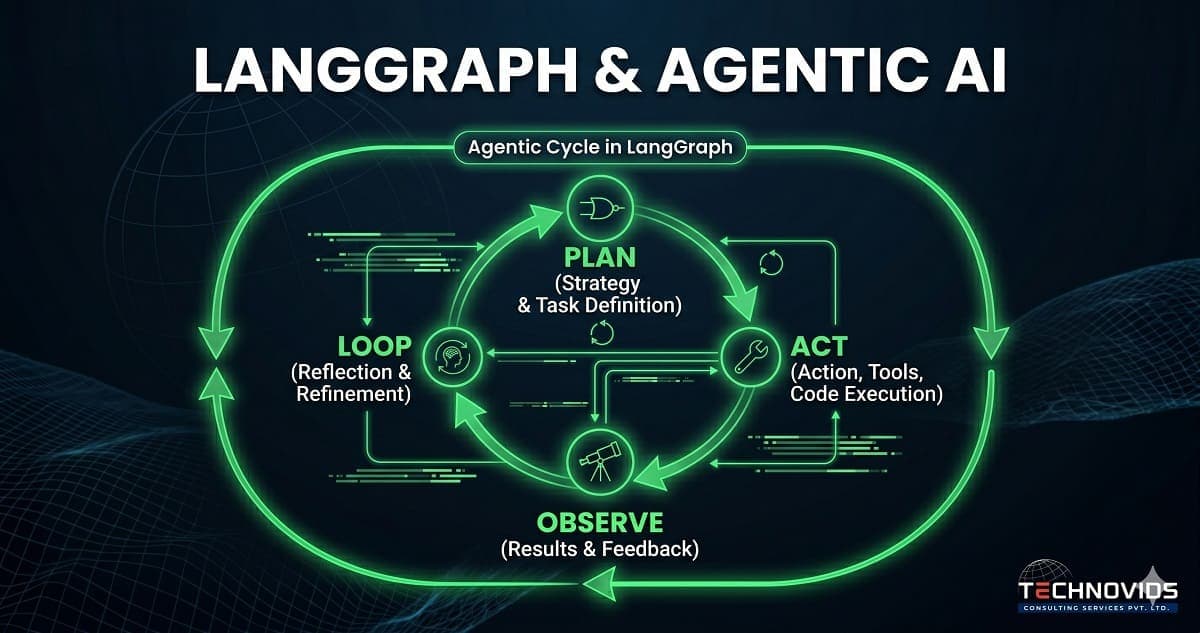
The key word is "stateful." LangGraph agents maintain a persistent state object that flows through the workflow, getting updated at each step. This state can represent conversation history, intermediate results, tool call outputs, error conditions, or any other information the agent needs to carry forward. The agent can loop back to earlier nodes, branch on conditions, and make decisions based on accumulated state — behaviours that are impossible with linear chains.
LangChain vs LangGraph: The Key Difference
LangChain is built around the concept of chains — sequences of steps that run top-to-bottom, once. Input goes in at the top, output comes out at the bottom. This is perfect for retrieval-and-answer pipelines, structured extraction, and summarisation tasks. But it breaks down for anything that requires iteration.
Real-world tasks often require iteration. A research agent needs to search, evaluate whether it found enough information, decide whether to search again with a refined query, and only proceed to writing once it has sufficient data. A code review agent needs to read code, identify issues, look up documentation for each issue, and loop back if new issues are found. A customer support agent needs to gather information, attempt a resolution, check whether the resolution worked, and escalate if not.
LangGraph models these workflows as directed graphs. Nodes are processing steps (LLM calls, tool calls, human checkpoints). Edges define the possible transitions between nodes. Conditional edges let the agent decide which path to take based on the current state. The agent runs until it reaches an END node — which might be after one loop or twenty, depending on what it encounters.
How LangGraph Works: Nodes, Edges, and State
Every LangGraph application has three components:
State: A typed data structure (usually a Python TypedDict) that holds everything the agent knows. State persists across all nodes and is updated as the graph executes. A research agent's state might include the original query, a list of search results, a list of key findings, a quality score, and a final answer.
Nodes: Python functions that take state as input and return an updated state. Each node does one thing — calls an LLM, calls a tool, validates output, formats a response. Keeping nodes focused and single-purpose is what makes LangGraph graphs debuggable.
Edges: The connections between nodes. A normal edge always goes from A to B. A conditional edge calls a function to determine which node to go to next — this is where the agent's decision-making lives. A node might route to "search_more" if quality is below threshold, or to "generate_answer" if sufficient information has been gathered.
This structure makes complex agent behaviour explicit and inspectable. You can look at the graph definition and understand exactly what the agent can do, which paths are possible, and under what conditions each transition fires. This is qualitatively different from a black-box prompt that might or might not reason correctly.
Why LangGraph Is the Production Standard
Three properties make LangGraph suitable for production that earlier approaches lacked.
Controllability. LangGraph lets you add human-in-the-loop checkpoints at any node. You can pause agent execution, inspect state, allow a human to modify it, and then resume. For high-stakes workflows — financial decisions, customer communications, code deployments — this is not optional. It is a requirement.
Debuggability. When a LangChain chain fails, diagnosing the failure means adding print statements and running it again. When a LangGraph agent fails, you inspect the state at each node and can see exactly what the agent knew, what it decided, and where it went wrong. Combined with LangSmith tracing, production debugging becomes genuinely tractable.
Fault tolerance. LangGraph supports persistence — saving graph state to a database between executions. This means long-running agents can survive failures, restarts, and interruptions. An agent processing a 500-document analysis does not start from scratch if the process is interrupted at document 300.
LangGraph vs CrewAI vs AutoGen
In 2025, the three most-discussed agent frameworks are LangGraph, CrewAI, and AutoGen. They take different approaches to the same problem.
LangGraph gives you a low-level, high-control graph abstraction. More code, more flexibility, better production properties. Best for teams building custom agent workflows where reliability and observability matter.
CrewAI abstracts agents as "crew members" with defined roles, goals, and tools. Faster to get started for role-based multi-agent scenarios. Less fine-grained control over execution flow. Better for prototyping than for production.
AutoGen (Microsoft Research) uses a conversational multi-agent pattern where agents talk to each other in natural language. Very powerful for open-ended reasoning tasks. Harder to control and deploy reliably in production enterprise scenarios.
For Indian enterprise teams building production AI, LangGraph is almost always the right choice. CrewAI is fine for rapid prototyping. AutoGen is better suited for research environments than product deployments.
Real-World LangGraph Use Cases
The teams deploying LangGraph in Indian enterprises are solving real business problems:
- Sales intelligence: An agent that researches a prospect's LinkedIn, company website, recent funding news, and CRM history — then drafts a personalised outreach email and logs the activity.
- Document processing: An agent that extracts structured data from unstructured contracts, validates it against business rules, flags exceptions, and only sends clean records to downstream systems.
- IT support automation: An agent that diagnoses an incident from logs, searches the runbook for resolution steps, attempts each step, and escalates to human engineers only when stuck.
- Financial reconciliation: An agent that pulls data from multiple sources, identifies discrepancies, traces root causes, and produces an exception report — replacing 4–8 hours of analyst time per cycle.
Getting Started with LangGraph
The prerequisite is solid LangChain knowledge — LangGraph builds on LangChain's tool calling and LLM interfaces. If you are not comfortable with LangChain chains and retrievers, start there first.
The learning path that works: build a single-node agent first (just an LLM with tools, no graph structure). Then add a simple loop — the agent can call a tool and then decide whether to call another tool or finish. Then add conditional routing. Then add state persistence. Each step teaches you something concrete and the complexity accumulates naturally.
LangGraph is covered in Module 3 of our Production AI Engineering corporate training — after RAG foundations and before MCP. If you want to learn it individually, our 1:1 mentorship programme covers LangGraph in Month 2 with dedicated sessions on real-world agent debugging. For broader context, see our guide to agentic AI training for developer teams in India.